Many researchers set up their studies to use the TurkPrime AutoApprove feature so that they do not need to manually approve worker assignments based on the secret code that workers enter. On occasion, a researcher may set up his study incorrectly which results in many worker assignments getting automatically rejected. This was a significant cause for distress among the Mechanical Turk workers who received rejections for their work which then went unpaid and also lowered their MTurk approval rating. This was also a sore point for TurkPrime researchers who had to deal with upset workers and correspond with them, and often reverse their rejections
To alleviate this issue, TurkPrime will give researchers greater control of the rejection process when AutoApprove is used:
Only worker assignments that have the correct secret codes will be auto-approved while workers with invalid secret codes will require manual rejection. (If a rejection is made in error by a researcher, it may still be reversed.) This manual rejection is made using the same interface as is available for non-AutoApproved workers as shown below.
Researchers will see the secret codes the workers entered and whether they were correct. they will then have the option to approve, reject or leave their status undecided.
The manual rejection process must be completed within the Amazon Approval window (default of 7 days). Otherwise, Mechanical Turk will automatically approve the pending assignments that were not resolved buy that time.
Showing posts with label reverse rejection. Show all posts
Showing posts with label reverse rejection. Show all posts
Friday, February 19, 2016

Wednesday, May 13, 2015
Reverse Rejections
Problem:
How can a Requester who rejected an assignment in error undo his mistake? A rejected assignment affects the Worker negatively and will often impact the Requester with negative feedback which can damage the Requester's online reputation which lowers Worker participation in future HITs. What can a Requester do to reverse the rejection?

Solution:
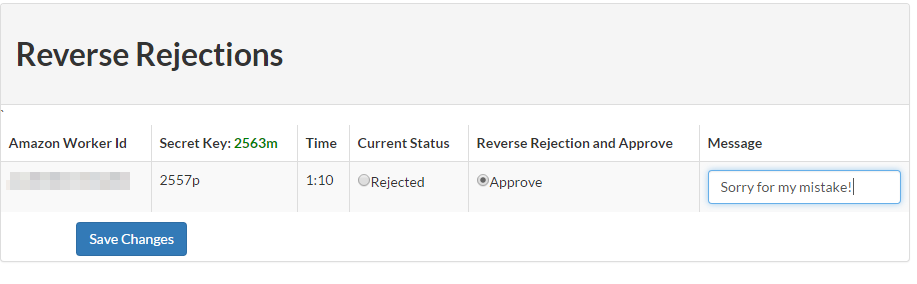
Reversing a rejection in TurkPrime is as simple as using the "Reverse Rejection" feature. Select the WorkerIds you wish to reverse, add an optional message. and you are done! No programming or installations are needed.
How can a Requester who rejected an assignment in error undo his mistake? A rejected assignment affects the Worker negatively and will often impact the Requester with negative feedback which can damage the Requester's online reputation which lowers Worker participation in future HITs. What can a Requester do to reverse the rejection?
Solution:
Reversing a rejection in TurkPrime is as simple as using the "Reverse Rejection" feature. Select the WorkerIds you wish to reverse, add an optional message. and you are done! No programming or installations are needed.
Friday, May 8, 2015
Qualtrics (and other platforms) Mechanical Turk Integration With TurkPrime
Run Qualtrics Surveys on MTurk using TurkPrime
Running Qualtrics surveys on TurkPrime streamlines two major pain-points that Requesters have dealt with:
The TurkPrime Design Survey Form is intuitive and similar to the MTurk Requester HIT Design form except that it adds many useful features like exclude Workers, target specific workers and much more. Below is a portion of the TurkPrime Design Survey form where you specify the Survey Hyperlink.

Qualtrics Surveys With Workers Specific Secret Keys on MTurk using TurkPrime
Now, you can also run Qualtrics surveys with TurkPrime Worker Specific Secret Keys. That means that each worker will be assigned a unique secret key to demonstrate that they completed the linked Qualtrics survey. There is no possibility that workers are sharing a secret key and not completing the linked survey.
Other Platform Integration
Running Qualtrics surveys on TurkPrime streamlines two major pain-points that Requesters have dealt with:
- Dynamic secret key that Workers must enter to verify completion of the survey where the code is unique per user and, therefore, un-shareable.
- Auto approval and rejection of worker assignments based on the dynamic secret key
- Passing the Mechanical Turk WorkerId and AssignmentId into Qualtrics so that Workers can be uniquely identified and matched up with MTurk.
The following describes these basic features and how to use them.
The TurkPrime Design Survey Form is intuitive and similar to the MTurk Requester HIT Design form except that it adds many useful features like exclude Workers, target specific workers and much more. Below is a portion of the TurkPrime Design Survey form where you specify the Survey Hyperlink.
Qualtrics Surveys With Workers Specific Secret Keys on MTurk using TurkPrime
Now, you can also run Qualtrics surveys with TurkPrime Worker Specific Secret Keys. That means that each worker will be assigned a unique secret key to demonstrate that they completed the linked Qualtrics survey. There is no possibility that workers are sharing a secret key and not completing the linked survey.
Other Platform Integration
The Dynamic Secret Completion Code can be easily integrated (and has been by many researchers) into other non-Qualtrics systems, as well. TurkPrime calculates the Secret Code based on query string parameters that TurkPrime adds to the url of your survey. These parameters are named:
abc
As long as your survey platform ensures that those query string values are preserved in the url when a participant reaches the last page of your survey that contains the TurkPrime iframe, then a completion code should get displayed.
This can be achieved by capturing the parameters within your study. Nearly all platforms support this functionality. Please contact us if you have questions..
Subscribe to:
Posts (Atom)