Some workers on MTurk are extremely active, and take the majority of posted HITs. This can lead to many issues, some of which are outlined in our previous post. Although MTurk has over 100,000 workers who take surveys each year, and around 25,000 who take surveys each month, you are much more likely to recruit highly active workers who take a majority of HITs. About 1,000 workers (1% of workers) take 21% of the HITs. About 10,000 workers (10% of workers) take 74% of all HITs.
TurkPrime now has a feature to allow researchers to exclude the most active workers so that you can collect data from less experienced workers who are less likely to have previously taken part in research similar to your own. Below is a screenshot of the “Naivete (Exclude most active Workers)” feature. You can select what percentage of workers you would like to exclude from the dropdown menu seen below.
Problem:
Requesters may observe that some workers, even those with high Approval ratings, may not perform to their expectations on a study. Sometimes this may result in rejecting their work which affects the Worker approval rating. But, often the work is not acceptable for research but is not worthy of rejection, or, it may simply be the policy of the research lab to approve all assignments for IRB or some ethical standard they may follow.
At this point the researcher may wish to exclude these workers from all future studies. MTurk has an option to Block a Worker (available through the API) but our experience has been that this solution is somewhat draconian and extreme: the effect of a Worker Block can trigger the suspension of the Worker's MTurk account.
(Source: When I was a newbie Requester in 2012 I blocked some workers who gave me inconsistent and poor responses . I learned the hard way by having my Turkopticon rating suffer and the MTurk Worker discussion groups spread the bad word. I responded to the Worker complaints and Unblocked them to undo the damage to their reputation -- and mine!)
Solution:
Create a Universal Exclude List using the TurkPrime Worker Group feature. This exclude list simply excludes all specified workers in this group from taking a study with this Group Requirement. When you design your studies, just add this exclude group to your Worker Requirements and none of the workers in this exclude group will be qualified to take your study.
This will achieve your goal of blocking undesired Workers without tarnishing their reputation.
Problem: You are running a longitudinal study and have identified 1000 workers who you want to allow to take your second phase studies. How do you easily group those workers for easy access.
Or you want to exclude certain workers from taking a number of your studies and wish to group them for easy exclusion in future studies. How can you do that?
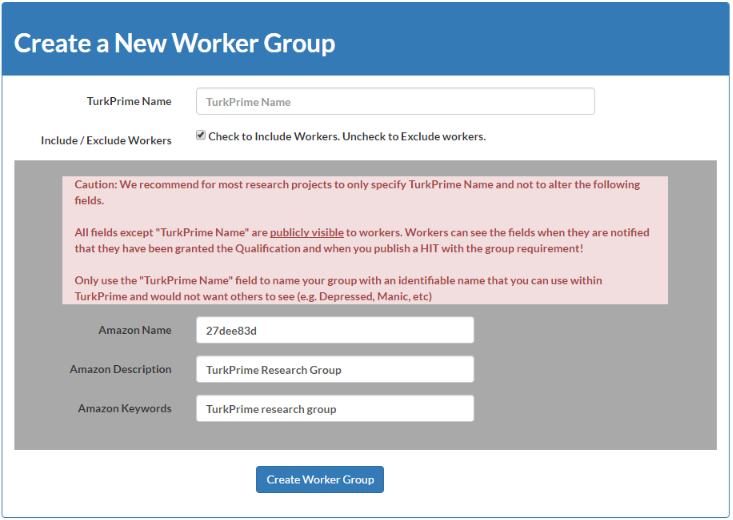
Solution: Use the TurkPrime Worker Groups feature available in the Manage Workers menu. This allows you to create reusable worker groups for either inclusion or inclusion in studies. You simply select whether this group is an include or exclude group, give it a clear name and specify the workers in the group.
Workers will not know why they were targeted for inclusion or exclusion since the MTurk Qualification name used is a random sequence of characters. The TurkPrime Group Name will not be visible to Workers. This is important so that you can run blind studies (i.e. the workers who are specified for inclusion will know they were targeted because they are exhibiting a certain personality, for example)
When you design your study, and specify Worker requirements, add this group to the worker requirements and all workers in that group will be wither included or excluded, as needed.
Problem: Ever want to run multiple simultaneous studies and needed to ensure that each worker only took a single study? There is no simple way to block workers who completed one study from accepting another study run at the same time....until now.
(The TurkPrime exclude feature will exclude workers who completed one study from taking another subsequent study but not if both studies are run at the same time.)
Solution: The TurkPrime Survey Group (arriving August 25, 2016) feature allows a user to assign multiple studies to a survey group. Then, any worker who accepts any study in that group will be disqualified from accepting any other study in that group. Your studies will be guaranteed to have a mutually exclusive group of respondents.
The
Survey
Group option is also a broader exclusion than the standard Exclude Worker option: Survey Group excludes workers who even only accepted one study from taking the other studies in the group, while the standard Exclude Worker option only excludes workers who completed the study but will not exclude workers who accepted but did not complete the first study from taking the second study.
Problem:
Suppose you're running a Mechanical Turk survey and need to exclude workers who took a previous survey. How can you quickly set this up.
Some of the currently used solutions require following multiple steps to set things up and are not turnkey solutions and others require Workers to enter their Worker ID, which may self-filter workers and limit the number of workers taking your survey.
Solution:
Create your surveys using TurkPrime.com's "Exclude Workers" feature. When your HIT launches it will have a Qualification Requirement that will limit your HIT to only the Workers not in your exclude list. All excluded workers will be unqualified from taking your HIT.